Training & Incidents
Logging employee training
How to record training events against a training program in Crown, attach evidence, and read the consolidated Training Log.
Crown keeps a record of who was trained, on what, and when. Training is run as a prerequisite program, and you log a training event each time someone is trained. The Training Log then gives you one consolidated, searchable view across every training program.
Before you start
You need a Training program before you can log any training events. It's one of Crown's prerequisite programs, so if you don't have one yet, create it first. See Setting up a prerequisite program.
Recording a training event
- Open the training program
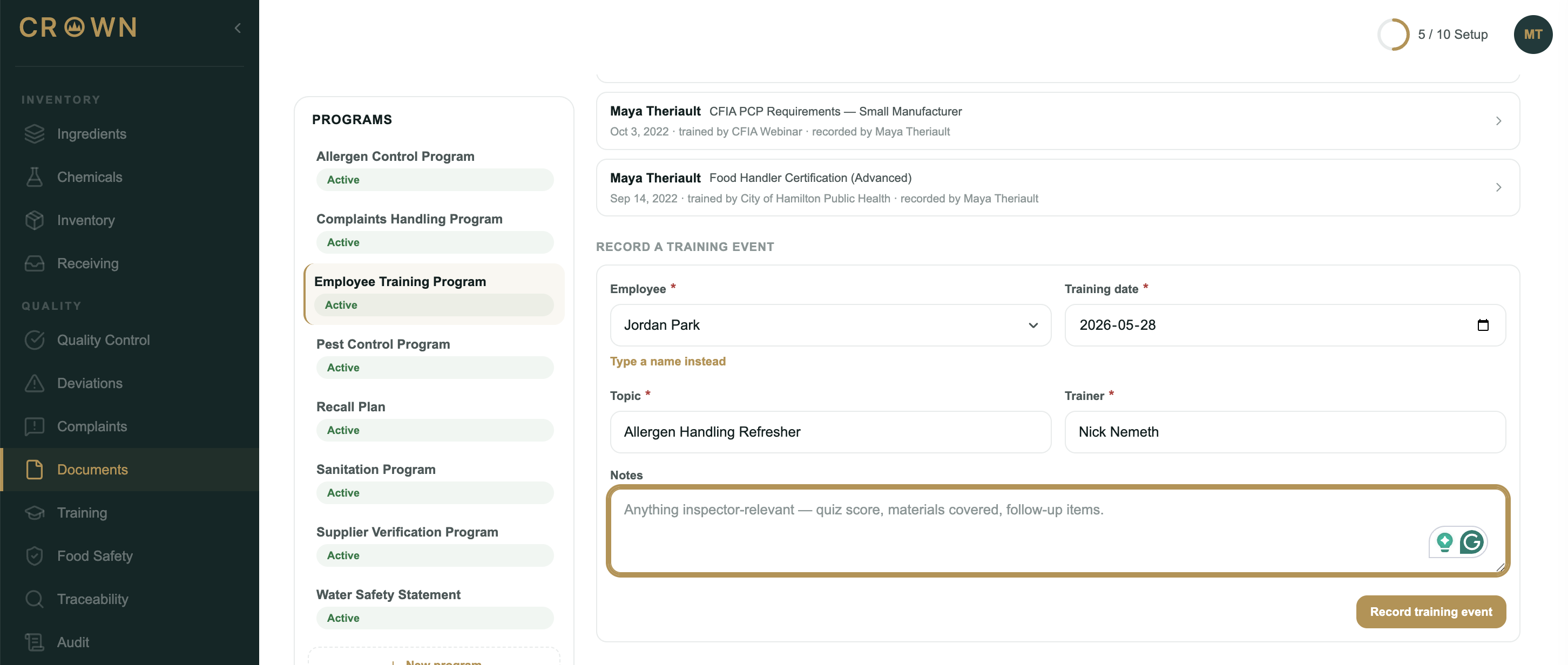
Go to Documents, open your training program, and find the Training events section.
- Fill in the event
Record the employee (pick a team member or type a name), the training date, the topic, and the trainer. Add notes if useful. Employee, date, topic, and trainer are all required.
- Record it
Select Record training event. It appears in the program's recent events list.
Evidence and closing the record
Expand a recorded event to attach evidence (a sign-in sheet, slide deck, or quiz scores) and to finalize it. Select Close and sign to lock the event with your e-signature.
Unlike sanitation or pest checks, training events have no pass or fail and no schedule: they're attestation records of training that happened.
The Training Log
The Training Log (under Training in the main menu) lists training events from all of your training programs in one place. Search by employee name, and filter by date range or program. It's a read-only view; you record and close events on the program itself.
What's next
Training is one of several prerequisite programs. See Setting up a prerequisite program for the others, and Compliance health for how active programs are tracked.