Traceability
Assigning lots to a batch
Recording which ingredient lots a batch actually consumed: the link that drives traceability and keeps on-hand inventory accurate.
When a batch consumes an ingredient, you tell Crown which received lot you actually used. That single action does two things: it forms the traceability link between the supplier lot and the finished goods, and it deducts what you used from on-hand inventory.
Selecting a lot
On an ingredient item on the production floor, choose Select lot. Crown opens a picker of the lots currently on hand for that ingredient.
- Pick a lot
Choose the lot you're drawing from. Each row shows the lot code, quantity available, and expiry date.
- Enter the quantity used
Record how much of that lot went into the batch.
- Record it
Save the allocation. Crown links the lot to the batch and reduces its on-hand quantity.
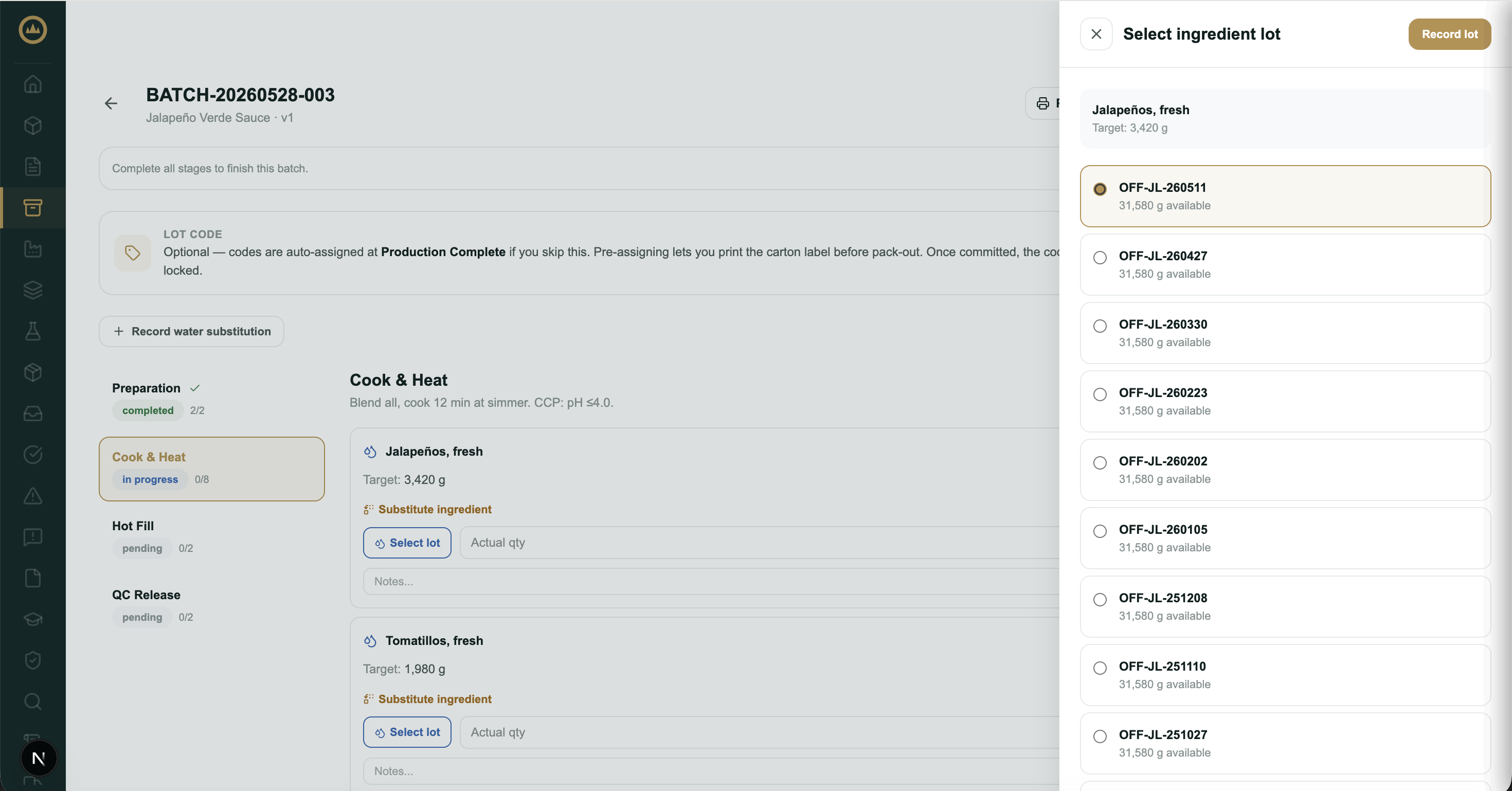
Earliest expiry first
Crown orders the picker by expiry date, earliest first, and pre-selects the earliest non-held lot, so by default you're drawing down the stock that expires soonest. Lots with no expiry date sort to the bottom. You can always pick a different lot.
Using more than one lot
If a single lot doesn't cover what the batch needs, add another. Crown tracks the quantity recorded against the target and shows how much is still outstanding (or flags it if you've gone over), so a delivery split across multiple supplier lots stays accurately recorded.
Held lots
A lot that's been placed on hold is shown with an On hold badge and its reason, but can't be selected — Crown also skips it when pre-selecting the earliest-expiry lot.
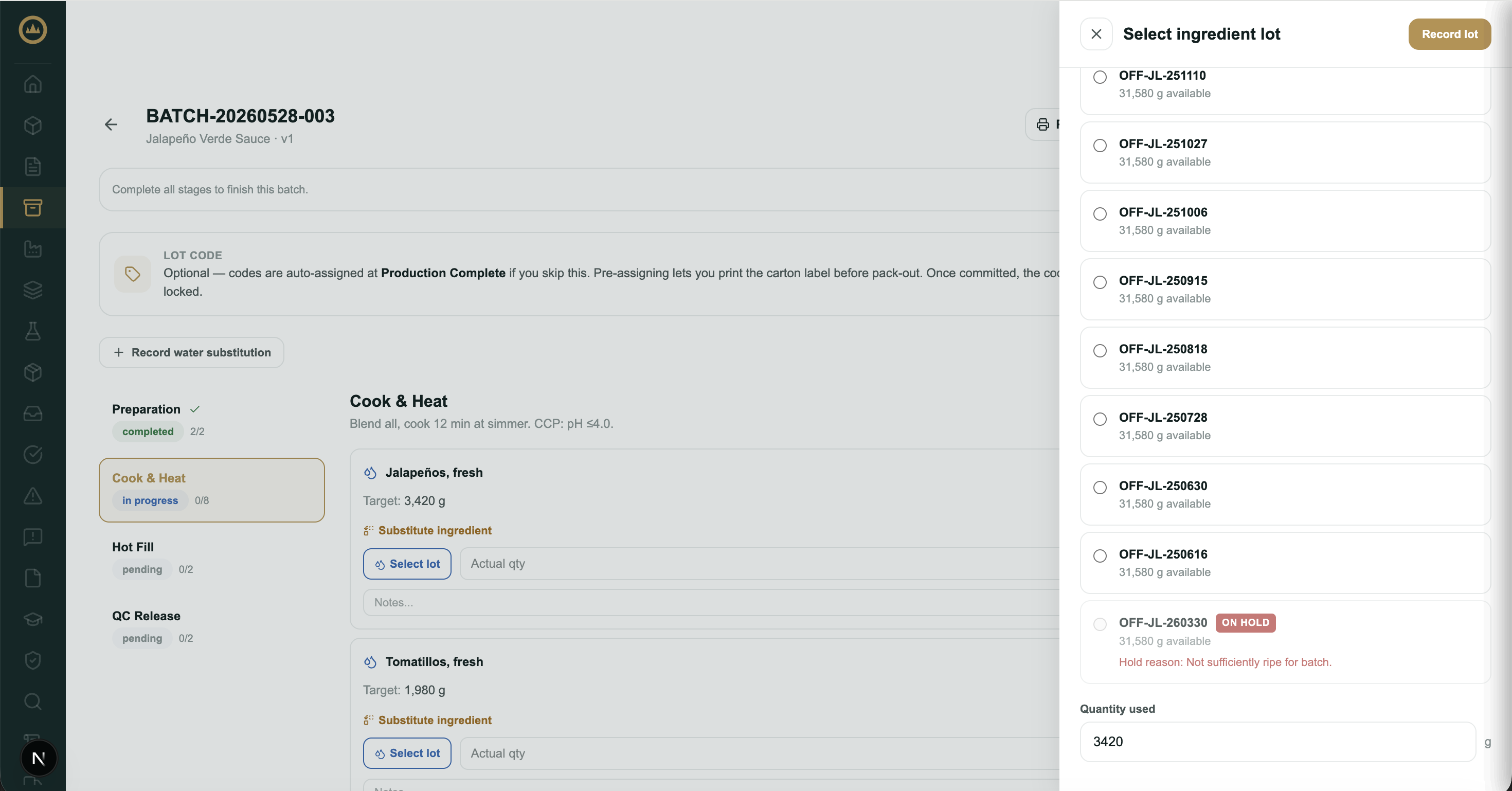
Inventory stays accurate
On-hand quantity decrements automatically as you record allocations, and Crown won't let you consume more of a lot than remains, so inventory reflects real consumption without a separate stock-keeping step.
Adding an ingredient that isn't on the recipe
Sometimes a batch takes an ingredient the recipe doesn't call for: a tweak you're trialling, or a last-minute addition. Choose Add ingredient on the production floor to record it. Pick the ingredient and lot, enter the quantity used, and give a reason. The addition is recorded against this batch only, and Crown logs a minor deviation so the change is on the record. The same drawer lists every off-recipe addition already on the batch, with its ingredient, lot, amount, and recorded reason, so you can see at a glance what's been added.
Fixing a mistake during production
If you recorded the wrong lot or quantity while the batch is still in progress, remove the entry with the X beside it on the ingredient item. The quantity returns to the lot's on-hand stock, and you can select the correct lot and record it again. Once the batch has left production, use Correct ingredient use instead (below).
Correcting ingredient use after the batch is complete
A batch that has left production (released, released with deviation, rejected, sent to rework, or disposed) can still have its recorded ingredient use corrected. Open the batch and choose Correct ingredient use in the status bar just below the batch header, next to Amend. The action only appears once the batch is out of production.
The drawer covers three kinds of correction:
- Adjust a quantity: change the amount recorded against an existing entry.
- Remove an entry: mark a recorded lot for removal.
- Record a missed lot: add a lot that was used but never logged. The picker only offers lots of ingredients already on the batch, ordered by expiry, and hides held or empty lots.
A reason is required, and everything you've staged applies in one step after you confirm; nothing saves partially. Inventory re-reconciles automatically: lowering or removing an entry returns stock to its lot, and adding or raising one draws stock down. If a lot no longer has enough on hand, or is on hold, Crown blocks the save and tells you what to resolve first. Each correction lands in the batch's audit trail as an amendment with your reason, so the traceability record and the paper trail stay aligned.
What's next
Lots assigned and stages complete, the batch is ready to wrap up. See Releasing a batch.