Getting Started
Setting up your ingredients
How to create and configure ingredients in Crown: measurement type, sourcing, allergens, GRAS, and storage settings.
An ingredient in Crown is more than a name and a quantity. It carries the measurement type that determines unit behaviour across every recipe and receiving record, the allergen profile that rolls up into your product statements, and the storage and sourcing settings that support traceability downstream.
Set up each ingredient once, and it's then available across all recipes, receiving records, and inventory tracking.
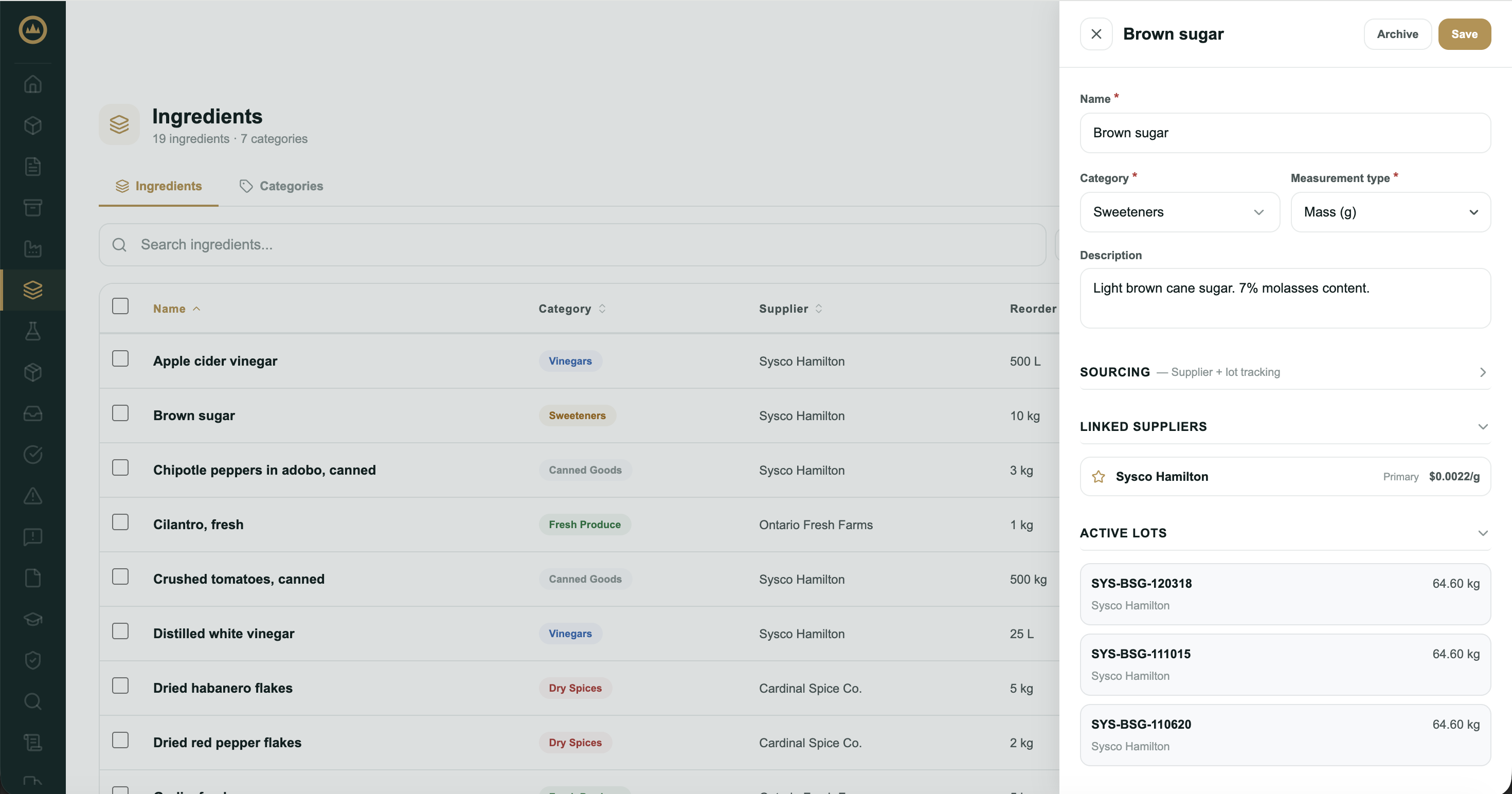
The essentials
Three fields are required to save an ingredient. Get these right first; one of them can't safely be changed later.
- Open the ingredient drawer
Navigate to Ingredients from the main menu (on a phone, Ingredients is under More) and select the 'Add ingredient' button. The ingredient drawer opens on the right.
- Enter a name
Use a specific, consistent name, the same one you'd write on a receiving label. Crown's recipe builder and receiving flow both reference this name, so inconsistency here creates friction later. "Citric acid monohydrate" is better than "citric acid." "Smoked paprika (Spanish)" is better than "paprika."
- Select or create a category
Choose a category from your list, or create one inline by typing a name and picking a colour swatch. Categories group ingredients in your catalogue; use them in a way that makes browsing and filtering fast for your operation.
- Set the measurement type
Choose Mass, Volume, or Count. This is the most consequential decision on the form. It sets the unit family for every recipe row, receiving record, and inventory entry that references this ingredient. Choose the type you actually measure this ingredient in during production.
Sourcing type
The Sourcing toggle determines how Crown treats this ingredient in your inventory and receiving flows.
Supplier + lot tracking (default): the ingredient is purchased from an external supplier, received into inventory by lot, and tracked through production. Use this for everything that arrives from outside your facility.
In-house utility: the ingredient is produced or sourced internally and isn't tracked by supplier lot. Selecting this hides the inventory and ordering fields (reorder point, SKU, CAS number). Use this for process inputs like filtered water, in-house cultures, or internally prepared solutions that don't have supplier documentation.
Inventory and ordering
These fields support reorder management and identification. All optional, all hidden when sourcing is set to In-house utility.
Reorder point: the on-hand quantity at which Crown flags a low-stock warning. Enter this in the same unit you think about inventory (e.g. kg), not necessarily the canonical unit.
SKU: your internal stock keeping unit for this ingredient. Useful if you cross-reference Crown records against a purchasing system.
CAS number: the Chemical Abstracts Service registry number for
the ingredient (e.g. 77-92-9 for citric acid). Optional, but useful
for ingredients with regulatory or safety documentation requirements.
Storage conditions
Temperature range: enter minimum and maximum storage temperatures in °C. Crown displays these alongside the ingredient on the receiving line and in the inventory lot drawer.
Shelf life (days): the ingredient's expected shelf life. When you receive a lot and leave its expiry blank, Crown defaults that lot's expiry to the received date plus this shelf life. An expiry you enter on the receiving line always takes precedence. Leave blank if the ingredient doesn't have a defined shelf life.
Storage instructions: free text for any additional storage requirements not captured by temperature or shelf life.
Certifications and attributes
A checkbox group of system-defined certifications (organic, kosher, halal, and similar) and quality attributes. Check any that apply to this ingredient as received. These appear on the ingredient record.
Allergen profile
The allergen profile is how Crown knows what's in your products. Every ingredient you add carries its own allergen declaration, and Crown rolls these up automatically into a read-only allergen summary on each recipe that uses the ingredient.
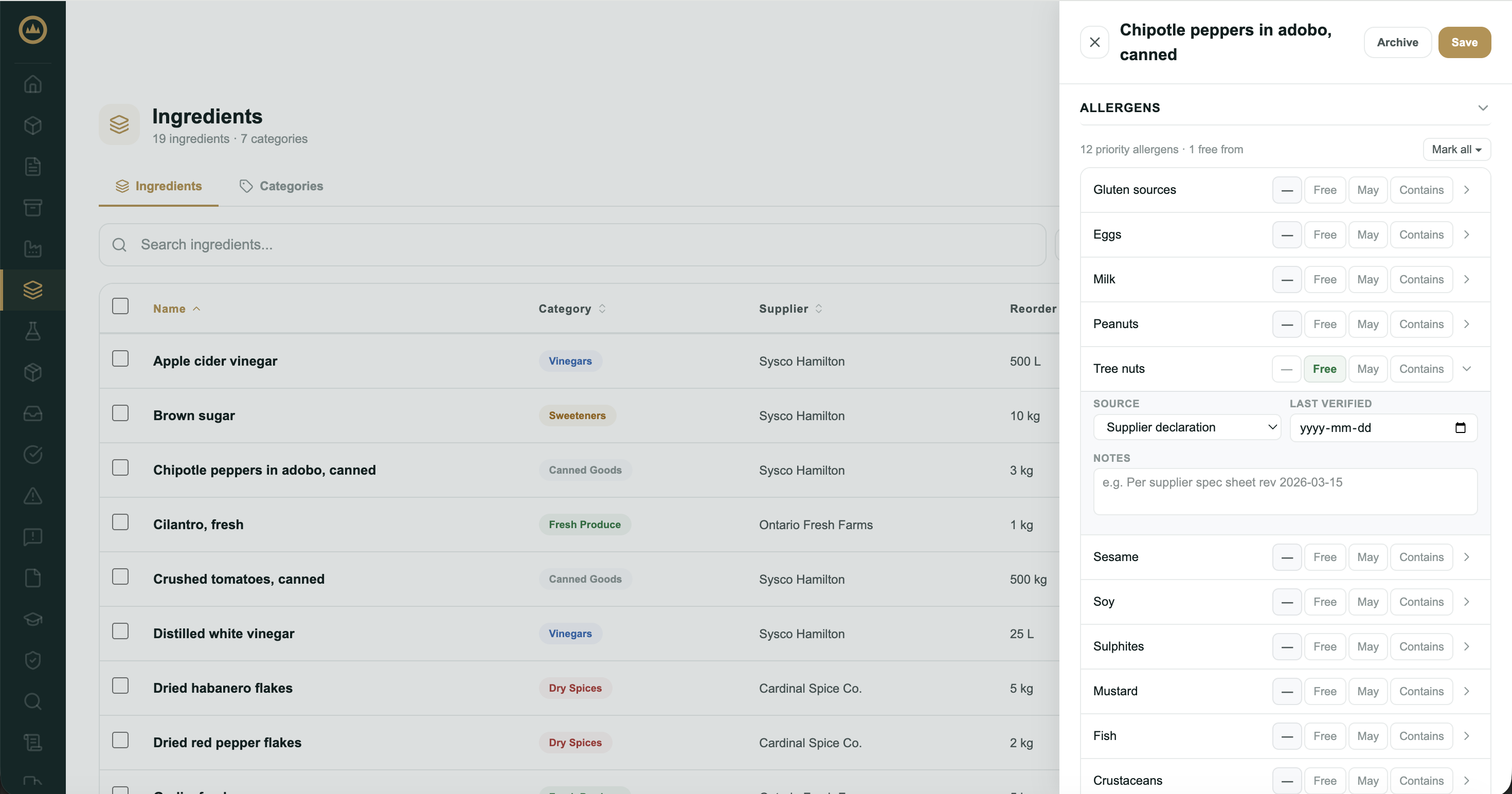
Crown tracks twelve priority allergens covering both Health Canada and FDA requirements:
Setting a state
Each allergen row has four state pills. Click the appropriate one:
- — Not declared (default): no claim is made for this allergen
- Free Free from: confirmed absent, typically backed by a supplier declaration or COA
- May May contain: cross-contamination risk, e.g. shared equipment or a facility with allergen-containing products
- Contains: present as an intentional ingredient
Expanding a row
Click the chevron on any row to set additional detail. Detail fields only appear when the state is not "Not declared":
- Source: how you know this allergen's status. Options: Supplier declaration · Certificate of analysis · Independent testing · Company assessment · System default
- Last verified: date of the most recent confirmation
- Notes: any supplementary context
Gluten and tree nuts have subtype rows (wheat, rye, barley, oats, triticale, spelt, kamut for gluten; individual nut varieties for tree nuts). Subtypes appear when the parent state is Contains or May contain.
Sulphites have an estimated concentration field (ppm) when the state is Contains or May contain. Crown displays the Health Canada ≥10 ppm threshold note alongside this field.
Bulk controls
A "Mark all" menu at the top of the allergen section offers two bulk actions:
- All free from: sets all twelve allergens to Free from. The source is left blank on each row for you to set where you have evidence.
- Reset all to not declared: clears all states. Requires confirmation.
After saving: additional surfaces
Once an ingredient is saved, the drawer gains additional sections that aren't available at creation:
Linked suppliers: a read-only list of suppliers associated with this ingredient through your receiving records. Supplier links are created through receiving, not here.
Active lots: a read-only view of current on-hand lots with quantities and expiry dates.
Recipe usage: a read-only list of every approved recipe that includes this ingredient, with per-batch demand figures.
Documents: file attachments for this ingredient, such as specification sheets, certifications, and supplier allergen statements. Per-lot COAs attach to the lot itself (from the inventory lot drawer), not here.
GRAS substantiation: a classification workflow for recording the regulatory basis for using this ingredient. If you need to document GRAS status for an ingredient, this is where that information lives.
Notes
A free-text internal notes field is available at both creation and in edit mode. Use it for anything operationally relevant that doesn't fit a structured field: sourcing notes, quality observations, or handling reminders.