Production
Starting a batch
How to start a production batch against an approved recipe, full or quick, and what Crown sets up when you do.
A batch is one production run of a product. Starting it creates the live production record you'll work through on the floor: the stages to complete, the lots you consume, and the finished goods you produce all hang off it.
Before you start
An approved recipe version. You can only start a batch against a product that has an approved recipe; draft recipes aren't selectable. If your recipe is still in draft, approve it first.
Starting a batch
- Open Batches and start a new one
Open Batches from the main menu and click '+ New batch'. The new-batch drawer opens on the right.
- Choose the product
Pick the product you're making. Only products with an approved recipe appear; Crown selects that product's latest approved recipe version automatically.
- Choose the batch mode
Pick Full batch or Quick batch (see below). Full batch is the normal choice for recipe-guided production.
- Review the preflight checks
Crown shows what the recipe needs against what's on hand: ingredient quantities, plus any calibration or held-lot warnings. These are advisory and don't block the start; you'll pick actual lots on the production floor.
- Start the batch
Add an optional note and select Start batch. Crown assigns a batch number and opens the batch in progress, ready to record against.
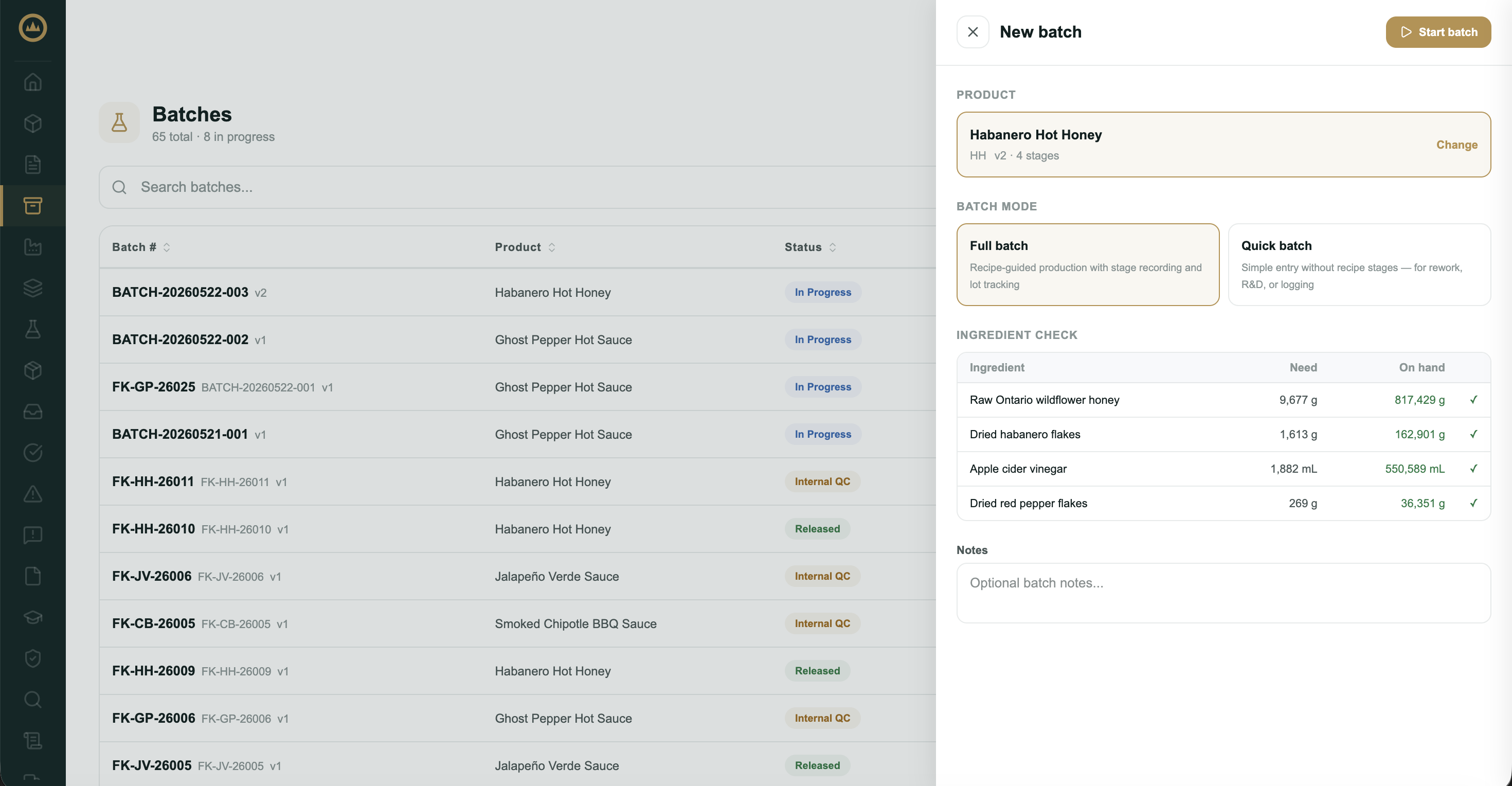
Full batch vs. quick batch
Full batch walks the recipe's stages and items in order on the production floor, with lot assignment and measurements recorded as you go. Use it for normal production; it builds the complete traceability and monitoring record.
Quick batch skips stage-by-stage execution and captures the essentials in a single form: ingredient lots, the recipe's critical control point readings, packaging counts, and yield. Use it for rework, R&D runs, or logging production that happened off-system. As on the full-batch floor, every critical control point needs a reading (or a logged deviation) before you can complete the batch, and an out-of-range CCP reading raises a deviation automatically.
Your progress is saved. A quick batch saves as you type: the indicator in the form header shows 'Saving…' and then 'Progress saved' as you work. You can leave and resume the form later, including from another device; the draft clears when you complete the batch.
Print a batch slip
The batch slip is a one-page paper companion for a batch: the product, batch number, product code, planned quantity, date created, and current status. You can print one at any point in the batch's life. Click Print Batch Slip at the top of any batch page to open the print dialog, where a live preview updates as you adjust the options:
- Paper size: a full sheet, labelled '8.5 × 11 in (Letter)', for a binder or clipboard, or '4 × 6 in' and '4 × 3 in' for label and tag printers.
- Header: toggles to show or hide your company logo and company name.
- Notes: an optional free-text note printed on the slip, with size (Small, Normal, Large), bold, and left or center alignment. Useful for a target completion date or a handling instruction for the floor.
When the preview looks right, choose Download to save the PDF or Open to print to print it straight away.
Every slip carries a QR code captioned 'Scan to open this batch'. Scan it with Crown's scanner or a phone camera to jump straight to that batch's record, so the paper on a clipboard or vessel always leads back to the live batch.
What's next
With the batch open, work through the floor. See Recording production steps.