Production
Packaging and fill records
Recording how many of each SKU you filled from a batch, and how Crown turns those counts into finished-good lots.
Packaging is where a batch's bulk output becomes countable finished goods. When you complete a batch, you record whatever you measured: units filled per SKU, an amount kept in bulk, a measured total yield, or a combination. Crown creates a finished-good lot for each SKU you filled, and one for any bulk you kept. Those lots carry the batch's lot code and are what you trace, hold, and release.
Before you start
At least one SKU on the product. Packaging counts units into the SKUs you've defined (a 200 mL bottle, a case of six, and so on). If your product has no SKU yet, add one before you complete the batch. See Creating a product.
Recording fill counts
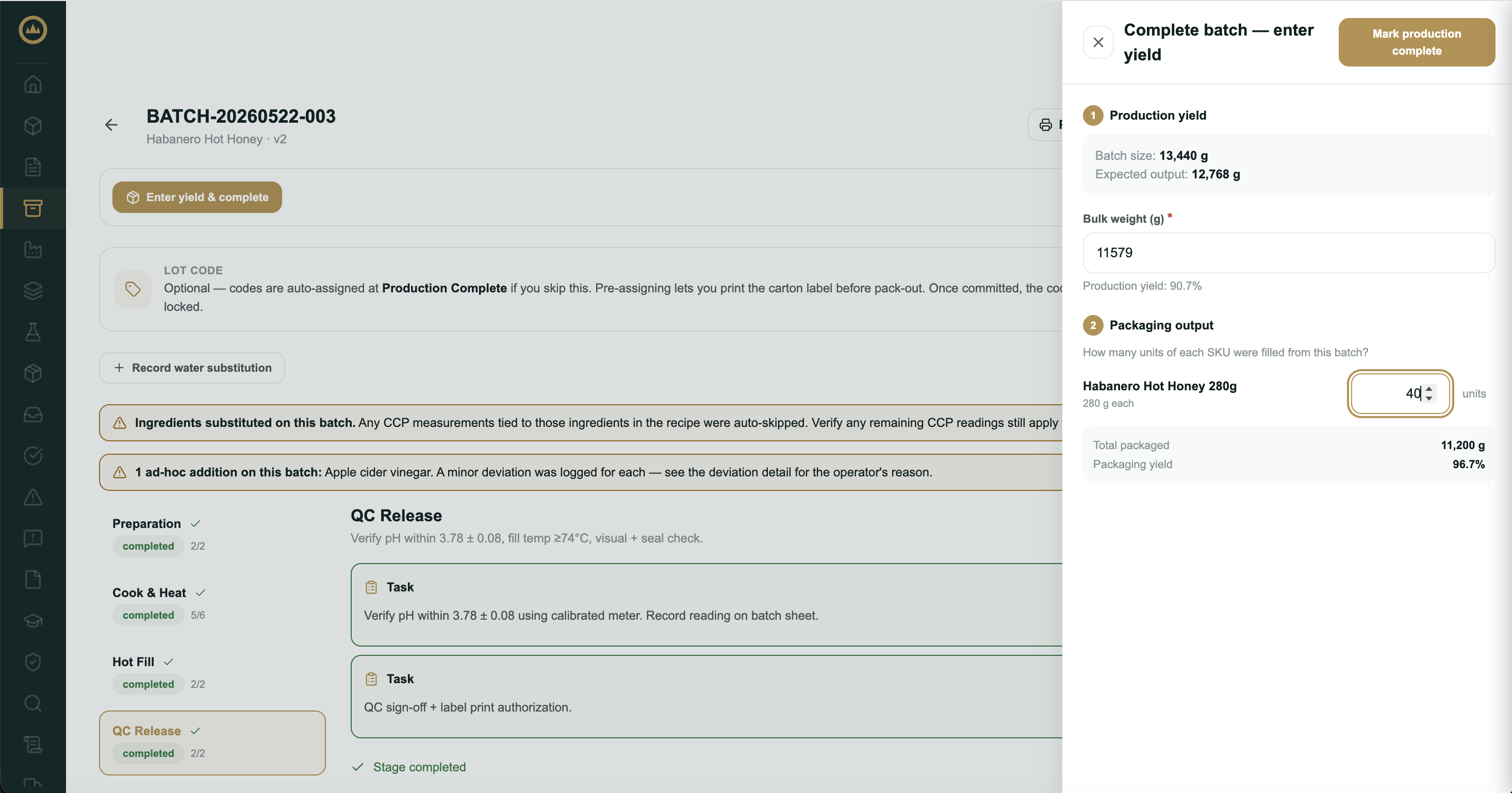
Packaging is recorded in the same step as yield. When every stage is complete, select Enter yield & complete. Record whatever you can measure; Crown needs at least one of a measured total yield, units filled per SKU, or an amount left in bulk to complete the batch.
- Enter the total yield, if you measured it
Total yield is optional. If you measured what the whole batch produced, enter it in the product's unit and Crown shows the production yield against the recipe's expected output. If the total couldn't be measured, leave it blank: Crown uses what you packaged, plus anything left in bulk, as the batch's output.
- Enter units filled per SKU
Under Packaging output, enter how many units of each SKU you filled from this batch. Crown shows each SKU's unit size for reference.
- Record anything left in bulk
If part of the batch stays unpackaged (still in the tank, a keg, or a pail), enter that amount in Left in bulk. Crown records it as inventory you can package later, not as loss.
- Mark production complete
Confirm. Crown creates a finished-good lot for each SKU you filled (and one for any bulk you kept) and moves the batch to Production Complete, ready for quality review.
Keeping some of the batch in bulk
The amount you enter in Left in bulk becomes its own finished-good lot under the batch's lot code, with the batch's expiry. It appears alongside the packaged lots in the batch's Output section, shown as "Bulk (unpackaged)", and on the Finished Goods tab in Inventory.
Loss and the over-fill warning
When you enter a measured total yield, Crown shows a running summary under the SKU counts as you type:
- Packaged (or Packaged + bulk when you kept some in bulk): what your counts add up to. Crown multiplies each SKU's unit size by the number you filled and adds anything left in bulk.
- Accounted for: that amount as a percentage of the measured total.
- Loss: the gap between the measured total and what you accounted for, as a quantity and a percentage.
If you didn't enter a total, there's no loss to itemize: Crown records what you packaged and kept as the batch's output.
Count products
For products measured by count rather than mass or volume, there's no total yield or left-in-bulk figure to enter. Crown takes your total output as the sum of the units you filled across all SKUs.
What happens to the finished-good lots
The lots Crown creates start on hold. Each one carries the batch's lot code (whether you pre-assigned it or Crown assigned it at completion) and an expiry based on the product's shelf life. They appear on the Finished Goods tab in Inventory right away, but become available to ship only when the batch is released.
Packaging bulk after completion
Bulk kept from a batch can be packaged into SKUs whenever you're ready, from either of two places:
- On the batch: the Output section lists everything the batch produced. A bulk row that still holds product offers a Package action.
- From Inventory: open the Finished Goods tab and select Package on the bulk lot's row.
Both open the same Package bulk into SKUs drawer. Enter how many units of each SKU you're filling; the units come out of the bulk lot's remaining quantity, and Crown won't let you package more than the lot holds. You can package in more than one pass: the Package action stays available while the lot still holds product that hasn't been used.
What's next
With output and packaging recorded, the batch moves to quality review. See Releasing a batch for the path from internal QC to released finished goods.